Using Custom Boards
Apio uses definitions of FPGA devices, FPGA programmers, and
FPGA boards to simplify the setup of new projects. The diagram below
illustrates the relationship between these definitions and Apio's operation,
as well as the names of their respective definition files in the apio
definitions packages
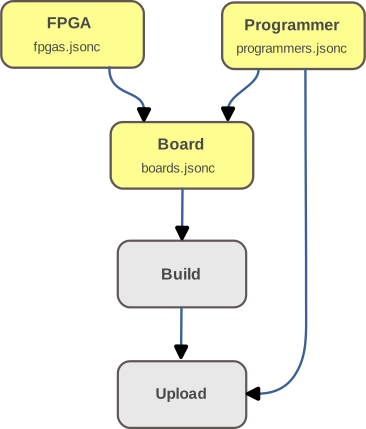
If any of these default definitions do not match the FPGA board you are using, you can override them by placing custom definition files in the top-level directory of your project. These replacement files should:
- Use the same file names and formats as the originals (
fpgas.jsonc,programmers.jsonc, orboards.jsonc). - Include only the specific FPGA, programmer, or board definitions you need. You can have one or more custom definitions in each of the three files.
Definition Files
| Definition File | Contains | Keyed By |
|---|---|---|
fpgas.jsonc |
FPGA definitions | fpga-id |
programmers.jsonc |
Programmer definitions | programmer-id |
boards.jsonc |
Board definitions | board-id |
Once you added custom definitions to your project, you verify that they took affect using the command
apio info projector the commandapio api get-project.
If you believe your custom definition may be useful to others, consider submitting a pull request to the apio-definitions repository.
Example: Custom boards.jsonc
The following is an example of a custom boards.jsonc file that defines
a variant of the upduino31 board:
{
  "upduino31c": {
    "name": "UPduino v3.1c",
    "fpga-id": "ice40up5k-sg48",
    "programmer": {
      "id": "iceprog"
    },
    "usb": {
      "vid": "0403",
      "pid": "6010",
      "product-regex": "UPduino v3\\.1c"
    }
  }
}
Example: Custom fpgas.jsonc
The following is an example of a custom fpgas.jsonc file that defines
a custom fpga definition ice40lp16k-cm121:
{
  "ice40lp16k-cm121": {
    "arch": "ice40",
    "vendor-part": "ICE40LP16K-CM121",
    "size": "16k",
    "ice40-params": {
      "nextpnr-type": "lp16k",
      "nextpnr-package": "cm121"
    }
  }
}
Example: Custom programmers.jsonc
The following is an example of a custom programmers.jsonc file that defines
a custom programmer definition fujprog-verbose:
{
  "fujprog-verbose": {
    "command": "fujprog",
    "args": "-l 2 --verbose"
  }
}
Note that the programmer command line can also be customized, within limit, using the board's 'programmer.extra-args" field.