Apio devices
apio devices
The apio devices command group scans and displays devices connected to your
computer. It is mainly used for diagnosing connectivity or driver issues.
Options
-h, --help Show this message and exit.
Subcommands
apio devices scan-usb
apio devices scan-serial
apio devices scan-usb
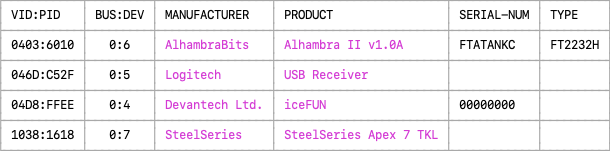
The command apio devices scan-usb scans and displays the USB devices
currently connected to your computer. It is useful for diagnosing FPGA board
connectivity issues.
Examples
apio devices scan-usb # Lists USB devices.
Options
-h, --help Show this message and exit.
Example output
apio devices scan-serial
The command apio devices scan-serial scans and displays the serial devices
currently connected to your computer. It is useful for diagnosing FPGA
board connectivity issues.
Examples
apio devices scan-serial # List serial devices.
Options
-h, --help Show this message and exit.
Notes
-
Devices like the FTDI FT2232 with multiple channels may appear as multiple entries—one per serial port.
-
On Windows, manufacturer and product strings of FTDI based devices may show their FTDI generic values rather than the custom values such as 'Alhambra II' set by the device manufacturer.
Example output
